| Specification | Details |
|---|---|
| Technology | 5 x 4 linear color CCDs (R, G, B and Gray) |
| Maximum Resolution (interpolated) | 9600 dpi |
| Optical Resolution | 1200 dpi |
| Maximum Scan Width | 42 inch (1067 mm) |
| Maximum Media Width | 43.3 inch (1100 mm) |
| Maximum Media Thickness | 0.6 inch (15 mm) |
| Accuracy | 0.1% +/- 1 pixel |
| Productivity (Batch Scanning, Arch E-size, RGB Color, 200dpi for 60 minutes) | 875 documents/hour (monochrome 875 documents/hour) |
| Color Space | sRGB, Adobe RGB, Device RGB, RAW RGB |
| USB Connection | USB3 with xDTR3 |
| Ethernet Connection | Gigabit with xDTR2.5 |
| File Formats | Multipage PDF & TIF, JPG, PDF, PDF/A, DWF, CALS, BMP, JPEG-2000(JP2), JPEG2000 Extended(JPX), TIF-G3, TIF-G4, and others |
| Touch Panel / Screen | 22” multi-touch widescreen, full HD TFT LCD, 1920×1080 dpi |
| Touchscreen Interface | VGA (analog input), DVI-D (digital input), USB (for touch connectivity) |
| Touchscreen Mounting | Optional, left or right side mounting, VESA mount 100 x 100 mm |
| Weight & Dimensions | 49.3 kg (109 lbs) – 1360×540×279 mm (53.6×21×11 inches) |
| Operating System | Windows 11 64-bit, Windows 10 64-bit, Windows Server 2022 Standard Edition |
| Energy Star Compliant | Yes |
| Upgradable | – |
| 200 dpi Grayscale/Monochrome Speed | 17.8 ips |
| Software Compatibility | AutoCAD®, MicrostationTM, ArcGISTM and all other CAD, GIS and image editing/storage applications |
| Power Supply | 100 V / 230 V / 240 V, 60/50 Hz |
| Scanner Stand (Optional) | Low stand available |
| Included Software | Full-featured Nextimage Repro (incl. TWAIN driver) |
| Power Consumption (ready/sleep/scan) | 39 W / <1 W / 130 W (built-in power supply) |
| Scan Speed (200 dpi RGB color) | 17.8 ips |
Document Scanner
Sales Enquiry
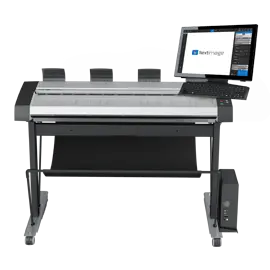
Contex HD Ultra X 4250 ScanStation PRO
Perfect for bureaus and other professionals
- CCD-technology
- 8.9 ips in 200 dpi RGB Color
- 1200 dpi
- $$$
Overview
The Contex HD Ultra X 4250 ScanStation PRO is a high-throughput, wide-format scanning solution that integrates a 42-inch HD Ultra X scanner with a built-in touch station and workflow console. It brings professional scanning, copying, archiving, and file management into a unified, operator-friendly unit.
Key Features & Benefits
On-device Touch Workflow Control
Operators can control scanning jobs directly from the ScanStation console. This reduces the need to walk back and forth between the scanner and a PC, boosting productivity and minimizing handling delays.
Tailored for Busy Environments
Designed for repro shops, architectural firms, and archival setups, the PRO edition supports rapid job switching, hands-free operation, and streamlined workflows to keep throughput high.
Versatile Media Handling
It supports a broad range of media types — from thin drawings and maps to thicker mounted boards — thanks to its adaptive feeding and thickness control mechanisms.
Automated Workflows & Smart Features
-
It detects document size automatically, eliminating manual adjustments mid-job
-
User presets and scan profiles speed up recurring tasks
-
Supports push/pull scanning across a network, allowing shared access in multi-user setups
High Image Quality & Color Integrity
The imaging technology in the ScanStation PRO maintains the same advanced CCD color capture system as the base HD Ultra X line, ensuring crisp detail, color accuracy, and minimal noise even with complex originals.
Efficient, Self-Contained Design
By combining scanner, console, touch interface, and stand, the unit is compact and efficient — ideal where space is at a premium but throughput remains critical.
Ideal for Professional Integration
It’s suited for environments where scanning must feed into CAD, GIS, electronic archives, or repro workflows. File formats are industry standard and workflows can integrate with existing systems.
Use Cases & Target Users
-
Reprographics and large-format copy centers
-
Architectural, engineering, and surveying firms digitizing large drawing sets
-
Municipal / GIS / mapping departments scanning maps, plans, and records
-
Archival and heritage institutions needing hands-on scanning of large format originals
-
Print service providers combining scanning, copying, and archiving in one station
Related products
-
Document Scanner
Canon imageFORMULA DR-M140 Scanner
-
Document Scanner
Kodak I4850 Scanner
-
Document Scanner
Canon imageFORMULA DR-M160II Document Scanner
-
Document Scanner
Kodak Scan Station 710 Scanner