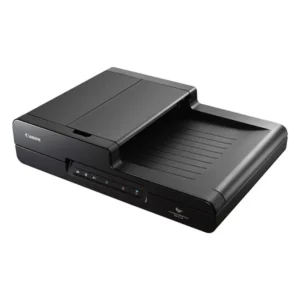
| Specifications | Details |
|---|---|
| Type | USB Powered Sheetfed Scanner |
| Scanning Sensor Unit | CMOS CIS 1 Line Sensor |
| Optical Resolution | 600 dpi |
| Light Source | RGB LED |
| Scanning Side | Front / Back / Duplex |
| Interface | Hi-Speed USB 2.0 & USB 3.0 |
| Dimensions (W × D × H) | Tray Closed: 285 x 95 x 40 mm Tray Opened: 285 x 257 x 174 mm |
| Weight | Approx. 1.0 kg |
| Power Requirements |
USB 2.0 bus power: 0.5A (1.0A with power supply USB cable) USB 3.0 bus power: 0.9A Optional AC Adaptor DC6V 0.8A |
| Power Consumption |
USB cable only: 2.5W (USB 2.0), 4.5W (USB 3.0) USB cable + power supply: 5.0W (USB 2.0), 7.0W (USB 3.0) Sleep mode: 1.5W Power off: 0.1W |
| Environmental Compliance | RoHS and ENERGY STAR |
| Black and White | USB 3.0: 15 ppm / 30 ipm USB 2.0: 12 ppm / 14 ipm |
| Colour | USB 3.0: 10 ppm / 20 ipm USB 2.0: 10 ppm / 10 ipm |
| Output Resolution | 150 x 150 dpi, 200 x 200 dpi, 300 x 300 dpi, 400 x 400 dpi, 600 x 600 dpi |
| Colour Mode | Black & White, Error Diffusion, Advanced Text Enhancement II, 8-bit Greyscale (256-Level), 24-bit Colour, Auto Colour Detection |
| Suggested Daily Duty Cycle | Approx. 500 scans / day |
| Long Document Mode | Up to 1,000 mm |
| Card Scanning | 54 x 86 x 1.4 mm (Embossed card scanning supported) |
| Paper Separation | Separation Pad Method |
| Feeder Capacity | 20 sheets (64 g/m²) |
| Other Features | Automatic Page Size Detection, Deskew, 3-Dimensional Colour Correction, Colour Dropout (RGB), Auto Colour Detection, Shading Correction, Text Enhancement, MultiStream, Preset Gamma Curve, Scan Panel, Prescan, Image Rotation, Skip Blank Page, Select Scanning Document Side, Scan Area Setting, Text Orientation, Continuous Scanning, Edge Enhancement, Moire Reduction, Prevent Bleed Through/Remove Background, Contrast Arrangement, Colour Drift, Background Smoothing, Shadow Cropping (on/off switchable), Trimming, Corrections for Photos, Auto Resolution Setting |
| Windows | ISIS / TWAIN Driver (Windows XP Pro / XP Home / VISTA / 7 / 8 / 10), CaptureOnTouch, CaptureOnTouch Lite, Cardiris |
| Mac | TWAIN Driver, CaptureOnTouch, CaptureOnTouch Lite |
| Accessories | Separation Pad, Feed Roller, Silex Scan-and-Print Server (USB to network), Canon Wi-Fi Unit WU10 |
| Operating Environment | 10 – 32.5 °C (50 – 90.5 °F), Humidity: 25 – 80% RH |
| Width | 50.8 – 216 mm |
| Length | 70 – 356 mm |
| Thickness | 52 – 128 g/m² (0.06 – 0.15 mm) |


Document Scanner
Sales Enquiry
CANON ImageFormula P-215 II Document Scanner
- 15 ppm | 20 sheets ADF
- Portable, ADF
- Max. paper size: A4
Overview
Most productive USB-powered scanning
The imageFORMULA P-215II is the most productive scanner in its class. With double-sided USB-powered scanning up to 30ipm and a 20-page automatic document feeder users can scan efficiently, in the office, at home or on the move. The P-215II has a strong robust design for handling up to 500 documents a day.
Ultra-compact for space-saving and mobility
With a smart, compact design, the ultra-lightweight P-215II is ideal for both users on the move and in the office. Its small footprint allows the scanner to fit comfortably into travel cases and onto busy desktops. True plug-and-scan is possible by simply connecting the scanner to any PC or Mac. Canon’s unique built-in CaptureOnTouch Lite software is ready to go – without any need to load drivers or application software.
Dedicated ID card scanner
With card scanning becoming increasingly important for ID authentication, the P-215II has its own dedicated card scanning slot. A sophisticated switchback feed mechanism ensures it quickly scans ID and embossed cards.
Enhanced image processing
Advanced technology allows for high precision scanning up to 600dpi. A rich range of image processing features, such as auto color detection, auto text orientation recognition, ensure superb scan quality that is ideal for creating searchable PDFs using OCR.
Powerful software suite
The P-215II uses both ISIS and TWAIN drivers to allow for easy integration with your standard imaging application and includes a full suite of software applications to help users work more effectively. The intuitive icon-based user interface of the bundled CaptureOnTouch software makes scanning quick and simple – while the Full Auto Mode function automatically applies the best settings for each scanning job. PageManager (Mac) and PaperPort (Windows) provide effective file management and conversion tools; while scanning business cards has never been easier with the BizCard application.
Direct scanning to the cloud
Thanks to the bundled plug-ins, users have the option to scan directly from CaptureOnTouch to a range of cloud services, including Evernote, Google Drive SharePoint, SugarSync, DropBox, and OneDrive. This allows information to be quickly uploaded to the cloud, for anywhere, anytime access.
Flexible wireless scanning
For the freedom to scan wherever you are, combine the P-215II with the optional WU10 Wi-Fi and battery unit. Use it to wirelessly scan documents directly to your smartphone, tablet or desktop PC, or share the scanner amongst a group of users or devices via a network server or home router.
Related products
-
Document Scanner
Kodak S2050 Scanner
-
Document Scanner
Canon imageFORMULA DR-F120 Document Scanner
-
Document Scanner
Kodak I4850 Scanner
-
Document Scanner
Canon Scanfront 400 Document Scanner